7 Meta Ads Mistakes That Are Burning Your Budget (And How to Fix Them)
According to Adweek, 45% of small business advertisers waste at least a quarter of their Facebook budget on campaigns that never convert. It is rarely bad luck. It is repeatable mistakes hiding in campaign setup, audience targeting, and creative strategy — the kind that look like normal performance on the surface while silently draining spend. This article covers the seven most expensive Meta Ads mistakes in 2026 and gives you specific, actionable fixes for each one.
Quick Answer: The seven most costly Meta Ads mistakes in 2026 are: wrong campaign objective, ignoring the learning phase, audience overlap between ad sets, missing exclusion audiences, stale creative (ad fatigue), poor conversion tracking setup, and spending all budget on cold traffic while ignoring retargeting. Ryze AI’s analysis of 1,200+ beginner accounts found these four errors — wrong objective, overlapping audiences, learning phase disruptions, and broken tracking — in 73% of underperforming campaigns.
Mistake 1: Choosing the Wrong Campaign Objective
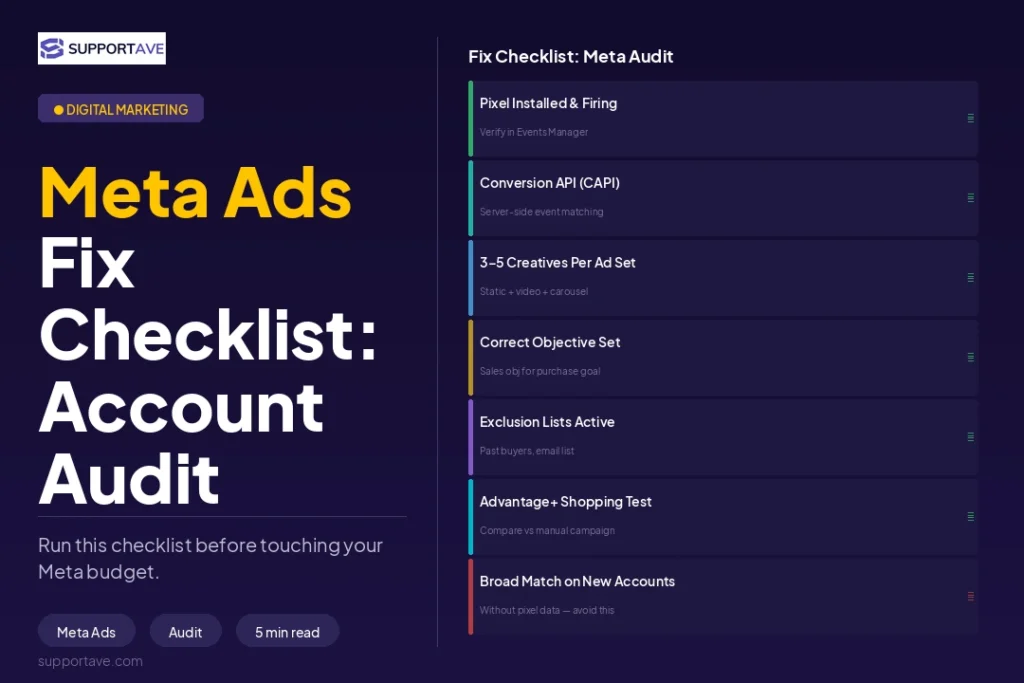
The mistake
Meta’s algorithm does exactly what you tell it. If you optimise for Link Clicks, it finds people who click links — not people who buy. If you optimise for Reach, it serves impressions to as many people as possible — not the ones likely to convert. According to Ryze AI’s 2026 analysis of beginner Meta accounts, choosing the wrong campaign objective wastes 25–40% of budget by optimising toward the wrong outcome.
The fix
Map your campaign objective to your actual business goal. For lead generation: select Leads objective. For online sales: select Sales. For app installs: select App Promotion. Do not select Traffic or Engagement objectives when your goal is revenue — these are fundamentally different audiences with different intent levels.
If you do not have enough purchase data for the algorithm to optimise (Meta requires approximately 50 conversion events per week per ad set to exit the learning phase), move up the funnel temporarily. Optimise for Add to Cart or Initiate Checkout rather than Purchase until volume builds.
Mistake 2: Disrupting the Learning Phase
The mistake
When you launch a new Meta ad set, it enters the Learning Phase — a period where Meta’s delivery system tests audience segments and placements to find who responds best to your creative. To exit this phase and achieve stable performance, Meta requires approximately 50 optimisation events per week per ad set. The most expensive mistake is panicking during the learning phase. A CPA spike on day two prompts a budget change of 30%, a headline swap, or a targeting adjustment — and the learning phase resets. You restart the clock and spend the next two weeks re-learning what you just abandoned.
The fix
Do not touch campaigns in the learning phase unless you are running out of budget or the CPA is genuinely unacceptable (more than 3x your target). Set a minimum evaluation window of 7–14 days and a minimum spend threshold before making any decision. Budget changes of more than 20% trigger a learning reset — if you need to scale, increase by 15–20% increments every 3–5 days rather than doubling overnight.
Key rule: If you keep restarting the learning phase, you are not optimising — you are paying for education twice.
Mistake 3: Audience Overlap Between Ad Sets
The mistake
When multiple ad sets within the same campaign target overlapping audiences, they compete against each other in Meta’s auction. The result: your CPM inflates because you are bidding against yourself, your data signals split across ad sets (making it harder for the algorithm to identify winners), and your total cost per conversion rises. Ryze AI’s 2026 audit data found that audience overlap inflates CPMs by 15–35% in affected accounts.
The fix
Use the Meta Ads Manager Audience Overlap tool. Navigate to Audiences, select the audiences you are actively using, click Actions → Show Audience Overlap. Consolidate or add exclusions for any audiences showing more than 20–25% overlap. Run one audience per intent stage and differentiate your seed lists (purchasers, leads, engaged visitors) to keep targeting segments genuinely distinct.
Mistake 4: No Exclusion Audiences
The mistake
Showing ads to people who already bought from you wastes budget and creates a poor experience — nothing damages a new customer relationship faster than seeing a ‘20% Off Your First Order’ ad the day after paying full price. Yet most campaigns run without any exclusion audiences, repeatedly targeting converted customers, recent enquirers, and existing subscribers.
The fix
Build and apply exclusion audiences before any campaign goes live. The minimum exclusions every account should have:
- Recent purchasers (last 30–90 days depending on your repurchase cycle)
- Current email subscribers (upload your customer list as a custom audience and exclude it from prospecting)
- Leads who have already converted (exclude from lead generation campaigns)
- Retargeting audiences from prospecting campaigns (stop showing prospecting ads to people already in your retargeting funnel)
According to Adstellar’s 2026 analysis, exclusion errors are one of the most common causes of invisible budget waste — campaigns that show decent aggregate metrics while burning spend on users who will never convert or who already have.
Mistake 5: Letting Creative Go Stale (Ad Fatigue)
The mistake
In 2026, creative is the primary targeting mechanism. Meta’s multi-modal AI reads your videos and images — analysing colours, text overlays, and the first two seconds of motion — to decide who to show them to. When your creative goes stale, frequency rises, CTR drops, and CPM climbs as the algorithm deprioritises low-engagement ads. Advertisers running one or two ‘perfect’ studio shots often miss 90% of their potential market.
The fix
Build a structured creative testing system, not a ‘tweak and pray’ approach. Each test should answer one performance question (does hook A outperform hook B? Does UGC outperform studio video?). The 2026 winning creative formula: prioritise the first 2–3 seconds above everything else. If the hook does not stop the scroll, the rest of the ad does not matter. Test different hooks against the same body copy before testing anything else.
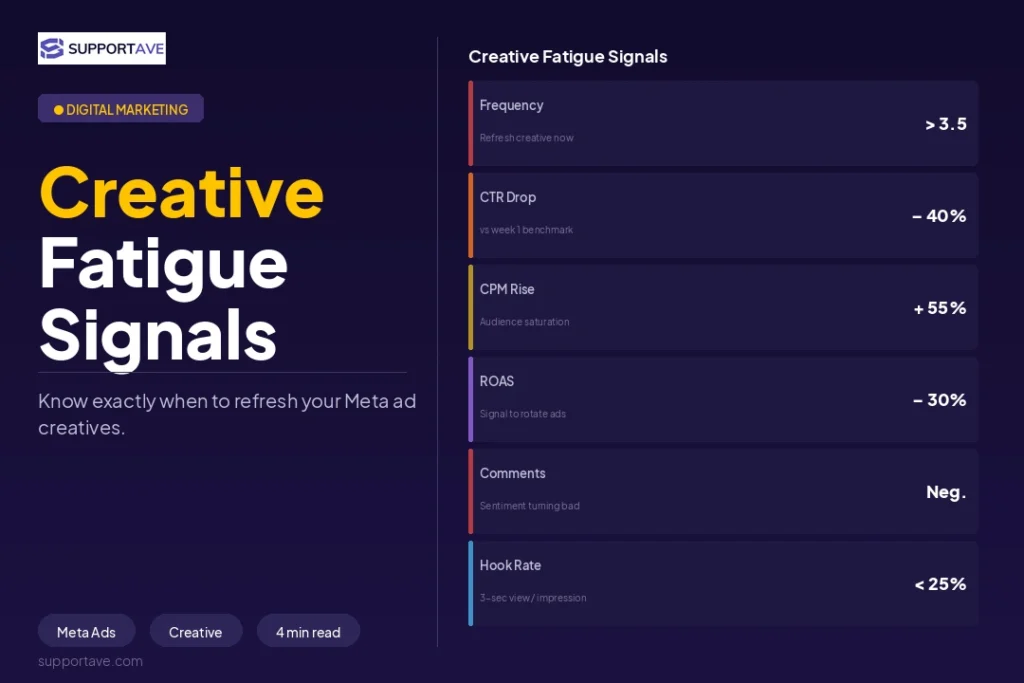
Monitor frequency. When frequency exceeds 3–4 impressions per user per week on a specific creative, performance typically begins declining. Refresh creatives proactively — not reactively when ROAS has already collapsed.
Mistake 6: Broken or Missing Conversion Tracking
The mistake
If Meta’s Pixel is not correctly tracking purchase or lead events, the algorithm has no data to optimise toward. It continues spending while flying completely blind. Ryze AI’s 2026 audit data found that poor conversion tracking accounts for 50–70% blind spend in affected accounts — budget that generates no measurable business outcome because the algorithm cannot identify what success looks like.
The fix
Verify your Pixel is firing correctly by checking Events Manager in Meta Ads Manager. You should see your key conversion events (Purchase, Lead, CompleteRegistration) appearing as ‘Active’ with recent activity. If not:
- Reinstall the Meta Pixel via Google Tag Manager and verify it fires on your conversion confirmation page.
- Implement the Meta Conversions API (CAPI) via server-side tracking. CAPI recovers conversion data lost to iOS App Tracking Transparency (ATT), which has caused a 70–80% opt-out rate since its 2021 launch.
- After implementing CAPI, check Events Manager for duplicate events and set up deduplication via the event_id parameter.
Critical in 2026: CAPI is no longer optional for any advertiser with iOS traffic. Accounts that have not implemented server-side tracking are running on significantly degraded attribution data and their Smart Bidding is making decisions based on a fraction of their real conversion signal.
Mistake 7: Spending Everything on Cold Traffic and Ignoring Retargeting
The mistake
Pouring 100% of budget into cold audience prospecting while ignoring the people who have already shown interest is one of the most expensive funnel mistakes in Meta advertising. Retargeting audiences — site visitors, video viewers, engaged social users, abandoned cart users — convert at 3–10x higher rates than cold audiences at a fraction of the CPM. Ignoring them is the equivalent of spending heavily to bring customers to the door and then refusing to let them back in.
The fix
Build an intent-based retargeting funnel alongside your prospecting campaigns. Segment retargeting audiences by depth of engagement, not just ‘all site visitors’:
- High intent: people who visited your pricing or contact page in the last 14–30 days. Show testimonial-heavy ads and strong CTAs.
- Medium intent: people who viewed a key product or service page but did not enquire. Show social proof and answer objections.
- Consideration: people who watched 50%+ of a video or engaged with a post. Re-introduce the brand and the offer with a different creative angle.
A well-structured retargeting funnel typically delivers 40–60% of total conversions from a much smaller budget than prospecting. The ratio that works for most businesses: 70–80% of budget on cold prospecting, 20–30% on retargeting, adjusted based on your audience pool size and funnel conversion rates.
Frequently Asked Questions
How do I know if my Meta Ads are in the learning phase?
In Meta Ads Manager, the Delivery column will show ‘Learning’ next to the ad set. A campaign exits learning once it achieves approximately 50 optimisation events per week (purchases, leads, or whatever your campaign objective is). If your ad set shows ‘Learning Limited’, it means the algorithm cannot gather enough conversion data — you may need to broaden your audience, increase your budget, or optimise for a higher-volume event further up the funnel.
How many ad creatives should I be testing at once?
Test 3–5 creatives per ad set — enough to give the algorithm options to optimise between, without fragmenting your data across too many variations. Each creative test should isolate one variable: hook vs hook, format vs format (video vs static), or offer angle vs offer angle. Testing too many variables at once makes it impossible to understand which change drove a performance difference.
What audience size is right for Meta Ads prospecting?
For prospecting campaigns, audience sizes between 500,000 and 2,000,000 typically perform best for most business budgets. Below 500,000, delivery becomes limited and CPMs rise. Above 2,000,000, relevance dilutes. In 2026, Meta’s algorithm has become more effective at finding buyers within broader audiences — hyper-niche targeting often underperforms broader targeting because it restricts the data pool the algorithm needs to identify purchase-intent signals.
Is Meta Ads Advantage+ worth using?
Advantage+ Shopping Campaigns (ASC) are worth testing for e-commerce brands with an established pixel history and strong creative. ASC gives Meta’s algorithm maximum flexibility to find and convert customers using your creative assets. The trade-off is reduced control over audience and placement. Most advertisers see ASC perform comparably or better than manual campaign setups after a 4–6 week optimisation period. For service businesses and lead generation, standard campaign structures with manual audience setup typically still outperform ASC.
How often should I refresh Meta Ads creatives?
Monitor your frequency score weekly. When a creative hits 3–4 frequency per user in a 7-day window, performance typically begins to decline. Most accounts need a creative refresh every 2–4 weeks for prospecting campaigns. Retargeting creatives can run longer (4–8 weeks) because the audience pool is smaller and turns over as new visitors enter the funnel. Building a regular creative production cadence — rather than reacting when ROAS collapses — is the single most effective operational change most Meta advertisers can make.
Supportave manages Meta, Google, LinkedIn, and TikTok ad campaigns with full creative production, audience strategy, and performance reporting. See our digital marketing services at supportave.com/digital-marketing.