
Next.js vs WordPress: Which Is Better for Your Business Website in 2026?
WordPress powers 43% of the entire web. Next.js is the fastest-growing framework among professional development teams. Both can build excellent business websites. Both rank well in Google. The question is not which platform can perform — it is which one makes performance easier to achieve and maintain for your specific business, team, and goals. This comparison covers every dimension that matters: speed, SEO, cost, security, content management, and long-term scalability.
Quick Answer: WordPress is better when your team needs to publish content frequently without developer involvement and your budget is under $10,000. Next.js is better when page speed, Core Web Vitals scores, custom UI, scalability, and long-term security maintenance are priorities. Many businesses in 2026 choose both — WordPress as a headless CMS backend with a Next.js frontend — to get editorial simplicity and engineering performance in one stack.
The Core Architectural Difference
WordPress renders pages dynamically on the server. Every page request triggers a PHP execution, a MySQL database query, 20–40 plugin hooks, and HTML assembly — then the result is sent to the browser. Caching plugins intercept some of this work, but the underlying architecture is request-response for every user visit.
Next.js pre-renders pages. Using Static Site Generation (SSG), pages are built at deploy time as static HTML and served from a global CDN. Using Server-Side Rendering (SSR), pages are rendered on the server before reaching the browser with no database query overhead on the page itself. Either approach eliminates the round-trip database latency that limits WordPress performance under load.
The performance difference is structural, not incremental. According to Webeons Technologies’ 2026 analysis, the average WordPress site loads in 3.7 seconds on mobile; the average Next.js site loads in under 1.5 seconds. That gap exists because the architectures are fundamentally different — WordPress requires constant optimisation effort to approach what Next.js delivers by default.
| Dimension | WordPress | Next.js |
| Mobile page speed (average) | 3.7 seconds | Under 1.5 seconds |
| Core Web Vitals pass rate | 44% (mobile) | 85%+ when built correctly |
| SEO tooling | Yoast / Rank Math plugins | Built-in metadata API, JSON-LD, sitemaps |
| Content editing | Gutenberg / Elementor (no code) | Requires headless CMS (Sanity, Contentful) |
| Security surface | Large — 90,000+ attacks/min globally | Minimal — no login page, no database exposed |
| Developer requirement | WordPress-savvy developer or agency | React/JavaScript developers |
| Plugin ecosystem | 60,000+ plugins | NPM packages (no plugin conflicts) |
| Hosting cost (monthly) | $20–$150 managed WordPress | $0–$200 Vercel/cloud hosting |
| Best for | Content-heavy sites, frequent publishing | Performance-critical, scalable, custom-UI sites |
Performance and Core Web Vitals
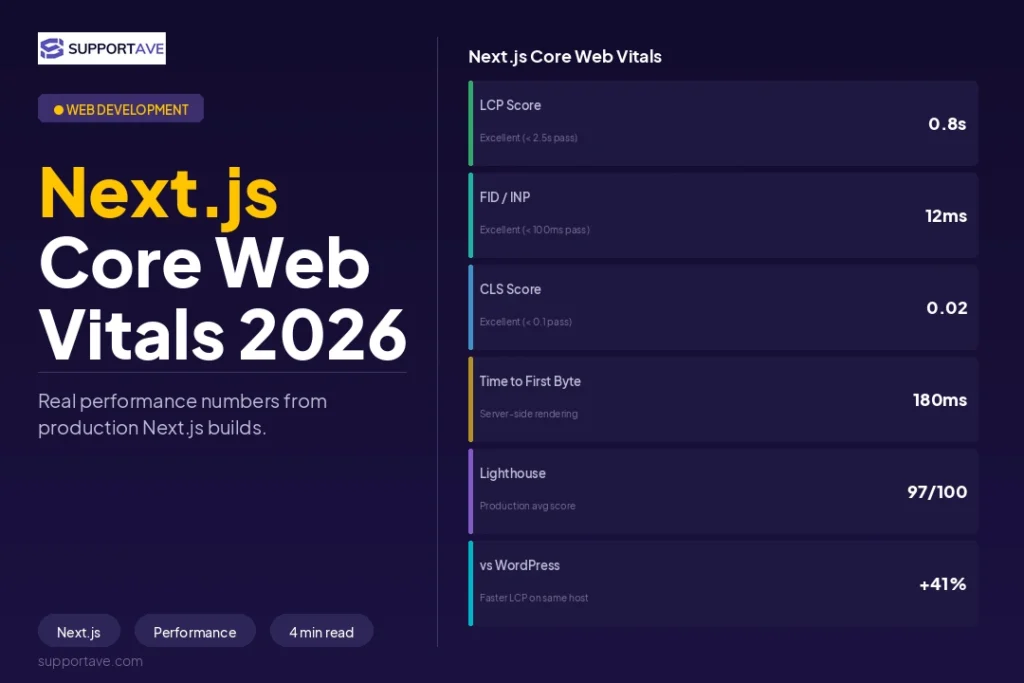
In 2026, Google’s Core Web Vitals — Largest Contentful Paint (LCP), Cumulative Layout Shift (CLS), and Interaction to Next Paint (INP) — are direct ranking factors. Only 44% of WordPress sites pass Core Web Vitals on mobile, according to data from SEO Mode’s 2026 performance analysis. The majority are actively failing Google’s ranking benchmark while their owners assume everything is fine.
The cause is architectural. WordPress page builders like Elementor and Divi generate bloated CSS and render-blocking JavaScript that pushes LCP scores into the ‘Poor’ range even on fast hosting. A lean custom theme with minimal plugins can pass Core Web Vitals, but it requires significant expertise and ongoing discipline to maintain.
Next.js sites consistently score 85–98 on Google PageSpeed Insights on mobile when built correctly. One developer case study reported an average 18.5% performance improvement across all pages after rewriting a WordPress site in Next.js, with the highest individual page improving by over 40%. These are structural gains, not optimisation tweaks.
The real question: Not ‘can WordPress pass Core Web Vitals?’ (it can, with effort) — but ‘can your team maintain those scores month after month as plugins update, content grows, and your site evolves?’ WordPress requires constant discipline. Next.js requires correct initial build.
SEO Comparison
Both platforms can achieve excellent search rankings. The differences are in how SEO is managed and how reliably it holds.
WordPress SEO
WordPress has a mature SEO plugin ecosystem. Rank Math and Yoast SEO provide meta title and description management, XML sitemaps, schema markup, internal linking suggestions, and readability scoring — all accessible to non-technical content editors. For teams publishing frequently, this is a genuine advantage: editors can optimise posts without opening a code editor.
The structural weakness: SEO capability depends on third-party plugins being maintained, kept compatible with each other, and updated in lockstep with WordPress core. Plugin conflicts can silently break sitemaps, canonical tags, or structured data. Database-stored SEO settings occasionally vanish during updates.
Next.js SEO
Next.js handles SEO at the code level via its built-in Metadata API (introduced in App Router). Meta titles, descriptions, Open Graph images, canonical URLs, structured data (JSON-LD), and XML sitemaps are implemented programmatically — version-controlled, predictable, and not subject to plugin conflicts.
Businesses migrating from WordPress to Next.js consistently report measurable organic traffic improvements within 60–90 days as Google re-crawls and re-evaluates Core Web Vitals scores — which can move rankings quickly in competitive niches (SEO Mode, 2026).
Cost of Ownership Over 3 Years
WordPress appears cheaper upfront. The true cost of ownership across 3 years tells a different story:
| Cost Category | WordPress (3-year total) | Next.js + Headless CMS (3-year total) |
| Hosting | $720–$5,400 managed WordPress | $0–$7,200 Vercel / cloud |
| Plugin licences | $600–$6,000 (ACF, Gravity Forms, Yoast, WP Rocket…) | $0 (NPM packages) |
| Security monitoring | $300–$900 | Minimal — no plugin attack surface |
| Developer maintenance (updates, conflicts) | $6,000–$24,000 | $2,000–$8,000 |
| Initial build | $3,000–$15,000 | $8,000–$25,000 (higher upfront) |
| Typical 3-year total | $10,000–$50,000+ | $10,000–$40,000 |
According to MigrateLab’s 2026 cost analysis, over a 3–5 year period the total cost gap between WordPress and Next.js typically reaches $5,000–$30,000 in favour of Next.js — because Next.js eliminates the ongoing plugin licence, security patching, and compatibility maintenance costs that compound with WordPress.
Security
WordPress is the most attacked CMS in the world. According to Freelancer Abhi’s 2026 security analysis, WordPress sites experience 90,000+ attacks per minute globally. The attack surface is large: outdated plugins, vulnerable themes, exposed admin panels (/wp-admin), and database injections.
A Next.js site with a headless CMS has a fundamentally smaller attack surface. Static pages have no server-side code to exploit. The CMS admin panel runs on a separate domain or behind authentication. There are no plugins adding unknown code to the execution path. Security incidents that cost businesses an average of $4.45M (IBM 2026 Cost of a Data Breach report) are dramatically less likely on a properly built Next.js architecture.
Content Management
This is where WordPress retains a genuine, significant advantage. Gutenberg (WordPress’s native block editor) plus Rank Math provides a content workflow that non-technical editors can operate confidently. Publishing, updating, scheduling, and managing media requires no code knowledge. For teams publishing 3–5 posts per week, this workflow is difficult to replicate.
Next.js requires a headless CMS for non-technical content editing. Sanity, Contentful, and Payload CMS are the most popular choices in 2026. These provide visual editors, preview modes, and publishing workflows — often with better UI than WordPress — but they require initial developer setup. Once configured, content teams work with the same ease as WordPress. The cost is the upfront investment to configure the headless layer correctly.
The Headless Hybrid: Best of Both
An increasingly popular approach in 2026 combines WordPress’s editorial strength with Next.js’s performance. WordPress serves as the backend CMS — content editors work in the familiar dashboard — while a Next.js frontend fetches content via the WordPress REST API or WPGraphQL and renders blazing-fast static pages.
According to Freelancer Abhi’s 2026 analysis, 70% of their client projects now use Next.js or headless WordPress + Next.js because the performance and SEO benefits are measurable and the content editing experience no longer requires compromise.
Headless WordPress sites achieve 50–150ms Time to First Byte from CDN edge nodes, compared to 200–800ms for cached traditional WordPress sites (eSEOspace, 2026). For high-traffic sites where speed directly affects conversion, this structural gap is significant.
Which Should You Choose?
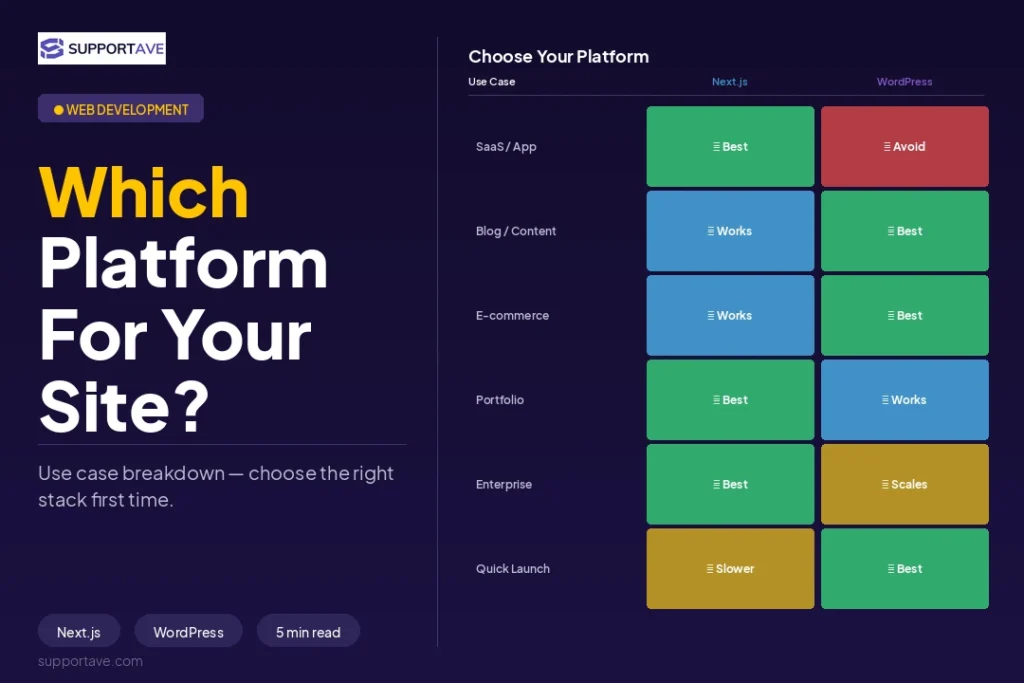
Choose WordPress when:
- Your budget is genuinely under $5,000–$8,000 and content publishing is the primary use case.
- Your team includes non-technical editors who need to publish independently without developer involvement.
- You are building a content-heavy site (blog, knowledge base, news) where editorial velocity matters more than architectural performance.
- You need plugins that replicate specific functionality faster than custom development allows.
Choose Next.js when:
- Page speed and Core Web Vitals scores are a priority and you want them to hold as the site grows.
- You are building a web application, SaaS product, or e-commerce platform with complex interactivity.
- Security maintenance overhead is a real concern — you have had WordPress security incidents or manage a site where breaches carry serious consequences.
- You have access to React/JavaScript development resources and plan to build custom features that page builders cannot deliver.
- Long-term scalability matters more than short-term development speed.
Frequently Asked Questions
Can WordPress achieve the same performance as Next.js?
With aggressive optimisation — a lean custom theme, server-level caching, a CDN, image compression, and disciplined plugin management — WordPress can pass Core Web Vitals and achieve competitive page speeds. But this requires significant expertise and ongoing maintenance effort. Next.js achieves competitive performance by default and maintains it more easily as the site evolves. Only 44% of WordPress sites currently pass Core Web Vitals on mobile, which indicates the gap between theoretical performance and real-world outcomes.
Is Next.js harder to maintain than WordPress?
Different types of maintenance, not necessarily more. WordPress requires constant updates (core, themes, plugins), security monitoring, plugin compatibility checks, and occasional conflict resolution. Next.js requires almost no maintenance once deployed to a platform like Vercel — but content changes require either a developer or a headless CMS setup. If your maintenance concern is security incidents and plugin conflicts, Next.js is lower-maintenance. If your concern is publishing workflow simplicity, WordPress is lower-maintenance.
How much more expensive is Next.js to build initially?
Typically 40–80% more expensive upfront. A professional WordPress site for a small business costs $5,000–$15,000. An equivalent Next.js build costs $8,000–$25,000. The gap narrows significantly over 3–5 years when you factor in the lower ongoing maintenance, hosting, plugin licence, and security costs of the Next.js stack.
Can I use WordPress as a backend with a Next.js frontend?
Yes — this is called headless WordPress, and it is increasingly the recommended approach for businesses that want both editorial simplicity and engineering performance. WordPress handles content management via its REST API or WPGraphQL; Next.js fetches that content and renders high-performance static pages. Your content team works in the familiar WordPress dashboard; your users experience sub-second page loads. Most professional agencies now consider this the default for serious business sites.
Will switching from WordPress to Next.js hurt my SEO rankings?
A poorly planned migration can damage rankings. A well-planned one typically improves them within 60–90 days. The critical requirements: comprehensive 301 redirects for every changed URL, preservation of all content that is currently ranking, correct metadata migration, and a full Google Search Console re-submission. Most clients see rankings improve — not drop — because the Core Web Vitals improvement from the migration is measured and rewarded by Google relatively quickly in competitive niches.
Supportave builds both WordPress and Next.js sites, and has delivered 120+ projects across both stacks. See our web development services at supportave.com/web-development — or contact us for a platform recommendation based on your specific requirements