
Shopify Store Development: What a Pro Agency Does That You Can’t Do With Templates
Shopify makes e-commerce look deceptively simple: pick a theme, add products, connect payments, launch. For a store doing a few thousand dollars a month, that simplicity is genuinely the right approach. But once a brand starts scaling, the gap between a templated store and what a Shopify store development agency actually builds becomes the difference between a storefront that converts and one that quietly leaks revenue on every page. This article explains exactly what professional Shopify development covers that a template cannot — and when that difference is worth paying for.
Quick Answer: A Shopify development agency builds custom theme architecture instead of adjusting a pre-made template — covering collection structure, product page hierarchy, app integration strategy, checkout optimisation, and performance engineering specific to your catalogue and customer journey. According to Shopify’s 2025 merchant survey, stores built by experienced developers convert 37% better on average than DIY builds, largely because professional builds account for platform limitations and page-load latency from the start.
Templates Solve a Different Problem Than Custom Development
A Shopify template is built to work reasonably well for thousands of different stores selling completely different products. That generality is its strength and its fundamental limitation. Templates make broad assumptions about your catalogue size, your product variants, your content structure, and your customer journey — assumptions that hold up fine for a simple store and break down as soon as your business has any complexity.
A professional agency doesn’t just make the site look better. It creates a theme structure that supports how you actually sell — collection templates, product page hierarchy, section-based landing pages, navigation logic, metafield usage, and reusable content blocks that your marketing team can manage without developer involvement every week.
What Custom Theme Development Actually Covers
1. Information Architecture Built Around Your Catalogue
Templates assume a generic product structure. A professional build maps your actual catalogue logic — how products relate to collections, how variants and bundles display, how filtering should work for your specific number of SKUs and attributes. A store with 40 products and a store with 4,000 need fundamentally different navigation and filtering architecture; a template treats them the same.
2. Product Page Hierarchy
Where a template gives you one fixed product page layout, custom development builds different page structures for different product types when your catalogue requires it — a configurable product needs different information architecture than a simple one-variant item. This directly affects conversion rate, because the right information in the right order at the right point in the page is what actually moves a browser to a buyer.
3. App Integration Without Bloat
Most growing Shopify stores accumulate a stack of apps — reviews, upsells, subscriptions, loyalty, email capture — and each one adds JavaScript weight to every page. A disciplined agency audits for overlap (removing duplicate capabilities across apps), protects performance by loading scripts only where needed, and plans for maintainability by choosing integrations your team can actually manage after launch. Templates with bolted-on apps rarely get this audit, and the performance cost compounds silently over time.
4. Checkout and Conversion Engineering
Cart abandonment averages around 70% across e-commerce. Professional Shopify development treats checkout flow, page speed at the critical moment of purchase, and mobile usability as engineering priorities, not afterthoughts. Brands using accelerated checkout options like Shop Pay, properly configured, see 10-15% higher conversion rates compared to standard checkout flows — but that configuration work is exactly the kind of detail a template doesn’t handle for you.
5. Liquid and API-Level Customisation
Shopify’s templating language, Liquid, combined with the Storefront API and Shopify Functions, allows custom logic that simply isn’t available through theme settings: custom pricing rules, bundle logic, B2B-specific catalogues, subscription handling, and checkout extensibility on Shopify Plus. This is genuinely developer-only territory — no amount of theme customisation through the admin panel reaches this layer.
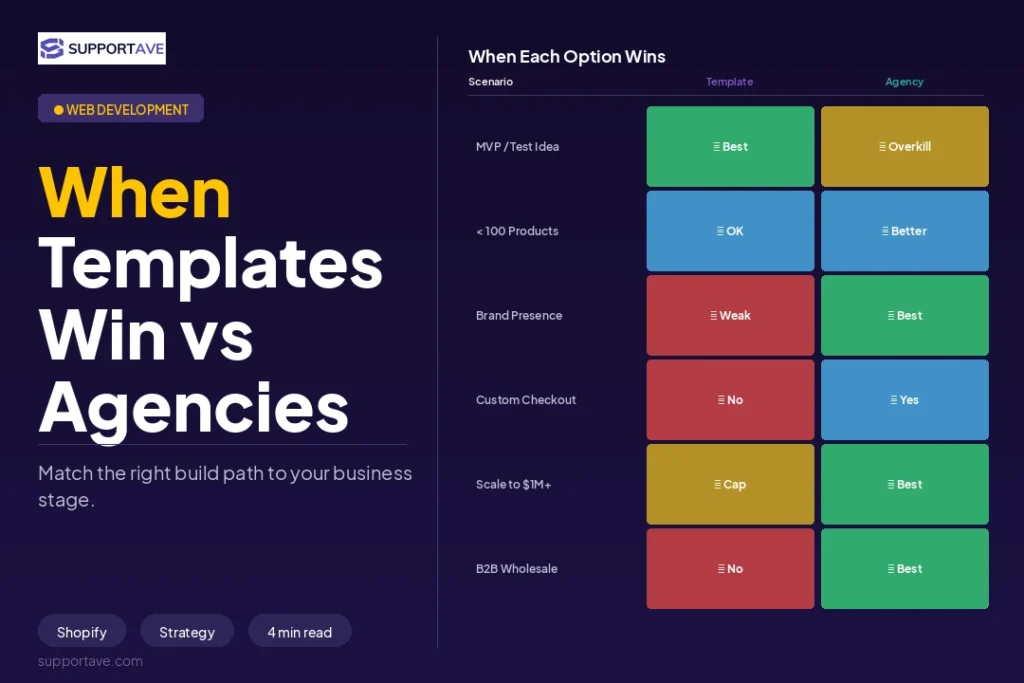
Template vs Custom: A Direct Comparison
| Factor | Template / DIY Theme | Custom Agency Development |
| Setup time | 1-3 weeks | 4-8 weeks (custom), 8-16 weeks (Plus/complex) |
| Cost range | $400-$750 | $1,800-$15,000+ depending on complexity |
| Catalogue fit | Generic, one-size structure | Mapped to your actual products and variants |
| App performance audit | Rarely done | Standard practice — overlap removed, scripts gated |
| Conversion optimisation | Limited to theme settings | Checkout, page speed, and UX engineered for your funnel |
| Scalability | Breaks down as catalogue/traffic grows | Built to extend without rework |
| Best for | Stores under $100K/year revenue | Stores scaling past $100K-$500K+/year |
Practical threshold: If your store makes under $100K/year, agencies are usually overkill — self-serve tools and templates cover most page and CRO work efficiently. Between $100K and $500K, a mix of self-serve tools and project-based agency work makes sense. Above $500K/year, a specialist Shopify retainer typically pays for itself within 2-3 months through conversion and performance gains alone.
What a Migration to Shopify (or Shopify Plus) Involves
Many businesses approach an agency specifically to migrate from WooCommerce, Magento, BigCommerce, or a legacy platform onto Shopify. A well-run migration is treated as an operational reset, not just a data transfer:
- Data structure migration: products, customer records, order history, and metafields mapped correctly — not just dumped into Shopify’s default schema
- 301 redirects: every changed URL mapped to preserve SEO equity built on the old platform
- Merchandising logic: collection rules, discount structures, and tagging systems rebuilt to match how your team actually merchandises, not a generic default
- App replacement: identifying which apps from the old platform have native Shopify equivalents versus which need custom replication
- Admin usability: ensuring your team can operate the new store confidently from day one, not just that the launch announcement looks polished
A migration succeeds when your team can run the new store on Monday morning without confusion — not when the homepage looks good on launch day. Agencies that treat migration as a checklist of moved data, without rebuilding the operational logic your team relies on, tend to produce stores that look right but feel harder to manage than the platform they replaced.
Ongoing Optimisation: Where the Real Gains Compound
The most valuable agency engagements often begin after the new store is live, not before. A common pattern: a redesign launches successfully, then real user behaviour exposes new bottlenecks within weeks — a product template that doesn’t convert as expected, an app conflict nobody anticipated, a campaign landing page that doesn’t match user intent.
This is where an ongoing optimisation model earns its value. Product templates get tested against real data, app conflicts get cleaned up, campaign landing pages improve based on session recordings and analytics patterns, and the next round of changes is driven by evidence rather than guesswork. Blend Commerce, named CRO Agency of the Year at the 2026 Global Agency Awards, builds their entire methodology around this cycle — heatmap analysis, session recording review, hypothesis generation, and iterative split testing applied specifically to Shopify merchants.
Signs Your Store Has Outgrown DIY
- Your team can’t move fast — merchandising updates, landing pages, or campaign changes keep getting delayed by technical limitations
- The theme is fragile — adding one new app or custom section creates layout issues or performance problems
- Mobile feels compromised — the store technically works, but key journeys feel slower or clunkier than they should
- Marketing and storefront are disconnected — paid traffic lands on pages that weren’t built for that specific conversion intent
- Your store reflects what was easiest to launch with, not what’s actually best for the business now
None of these require a dramatic failure to justify outside help. More often, the signs are operational friction that accumulates quietly until it’s costing real revenue every week.
What This Costs in 2026
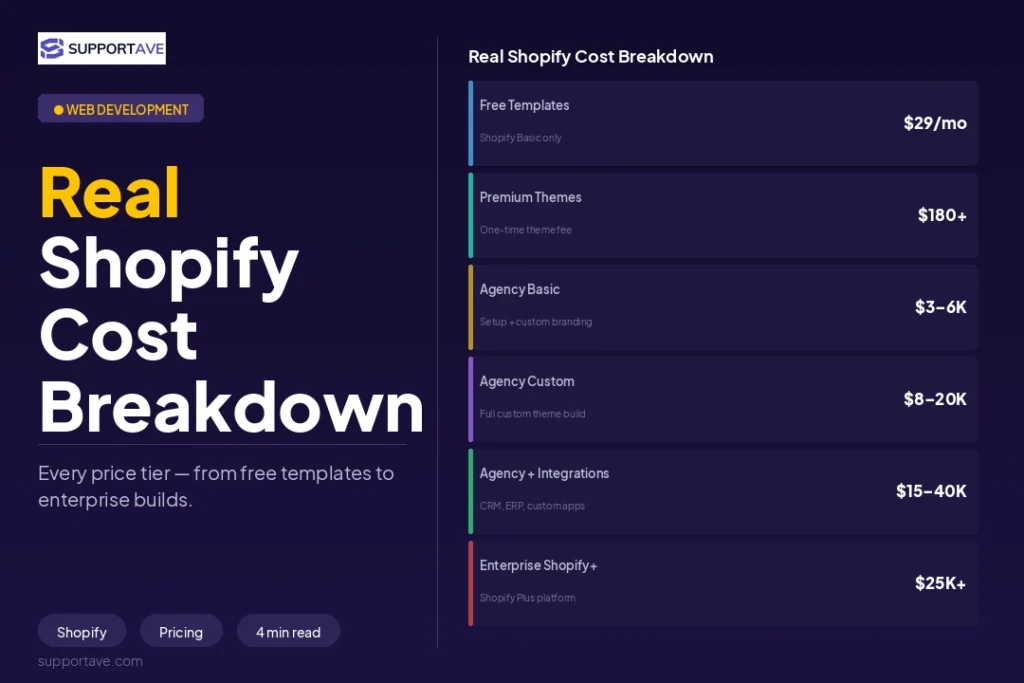
| Project Type | Typical Cost | Typical Timeline |
| Light theme customisation | $850-$1,850 | 1-3 weeks |
| Full custom theme build | $1,800-$6,000 | 4-8 weeks |
| Custom build with integrations | $10,000-$15,000 | 6-10 weeks |
| Shopify Plus custom development | $15,000-$50,000+ | 8-16 weeks |
| Platform migration (Magento/WooCommerce → Shopify) | $8,000-$30,000 | 6-12 weeks |
| Ongoing CRO / optimisation retainer | $1,500-$8,000/month | Ongoing |
Frequently Asked Questions
Is a template ever the right choice over custom development?
Yes — for stores under roughly $100K/year in revenue, with a straightforward catalogue and no complex integration needs, a well-chosen template is often the more sensible investment. The cost of custom development only pays for itself once catalogue complexity, traffic volume, or conversion rate improvements justify the engineering investment. Starting with a template and migrating to custom development as you scale is a perfectly reasonable growth path.
How long does custom Shopify development take?
Light customisation of an existing theme takes 1-3 weeks. A fully custom theme build typically takes 4-8 weeks. Shopify Plus builds with custom apps, B2B features, and complex integrations can take 8-16 weeks. Migrations from another platform typically run 6-12 weeks depending on catalogue size and the complexity of historical data being moved.
What’s the difference between Shopify and Shopify Plus development?
Shopify Plus unlocks enterprise-level capabilities not available on standard Shopify: checkout extensibility (customising the checkout flow itself, not just the storefront), Shopify Functions for custom business logic, multi-market and multi-currency expansion, and higher API rate limits for complex integrations. Plus development requires specialist expertise — verify any agency holds Shopify Plus Partner status, not just standard Partner status, before committing to a Plus build.
Do I need an agency for ongoing Shopify maintenance, or can my team handle it?
This depends on your team’s technical capability. Shopify itself handles hosting, core security, and platform updates automatically — that part doesn’t require an agency. What typically does require ongoing support is theme and app compatibility as Shopify ships platform updates, performance monitoring as your catalogue and traffic grow, and continued conversion optimisation. Many merchants run successfully with an agency on a light retainer rather than a full-time hire, since the ongoing workload is usually inconsistent rather than constant.
How do I know if a Shopify agency is actually good, versus just experienced-sounding?
Ask for live stores they’ve built that you can visit and test yourself — not just portfolio screenshots. Ask for case studies with specific, measurable outcomes: revenue growth, page speed improvements, or conversion rate lifts, not generic praise. Verify their Shopify Partner tier in the official Partner directory, and if you need Plus-specific features, confirm they hold Plus Partner status specifically. A confident agency with real results will readily provide all of this without hesitation.
Supportave builds custom Shopify stores designed around how you actually sell, not a generic template structure. See our web development services or contact us to discuss your Shopify project.