
Email Support Outsourcing: How to Handle 500+ Tickets a Day Without Hiring
At 50 tickets per day, email support is manageable. At 200, it starts slipping. At 500 or more, it becomes a full operational problem: response times blow out, quality degrades, your team burns out, and customers feel it directly in their experience. The answer most businesses default to is hiring. The answer that actually scales is a combination of outsourcing, automation, and process design. This guide covers how to handle high-volume email support without proportionally growing your headcount, and what that operation looks like when it is built correctly. For the broader context on outsourcing your support operation across channels, our complete customer support outsourcing guide covers the model selection, cost benchmarks, and partner evaluation framework in detail.
Quick Answer: Handling 500+ email tickets per day without proportional hiring requires three things working together: an AI triage layer that categorises and prioritises tickets before any human touches them, a dedicated outsourced agent team (not shared agents) working inside your existing helpdesk, and a macro and automation library that resolves 50 to 60% of routine tickets in under 90 seconds per agent. According to Deloitte research, outsourcing reduces cost per ticket by 40% compared to equivalent in-house staffing, and AI-assisted drafting reduces agent handle time by 20 to 35% on transactional ticket types.
Why Volume Is the Breaking Point for In-House Email Support
Email support breaks down at scale in a predictable pattern. At low volume, a small team handles everything manually and quality is consistent. As volume grows, handle time pressure increases, canned responses get used more broadly, personalisation decreases, and the team starts making triage decisions under pressure rather than by design. Response time SLAs slip. CSAT declines. Escalations that should have been resolved at Tier 1 pile up at Tier 2.
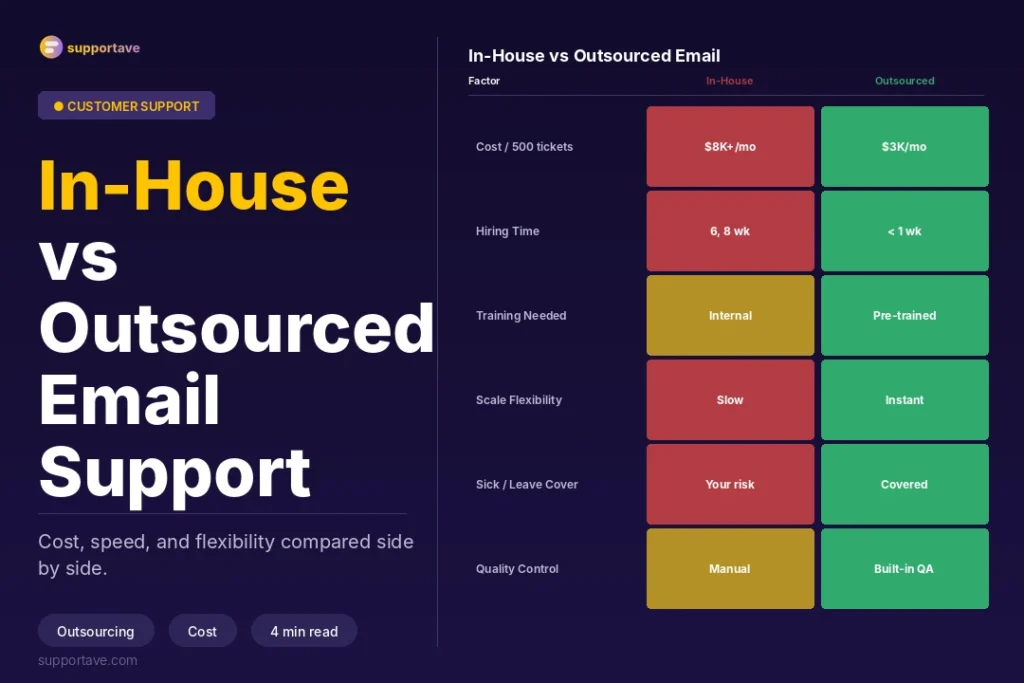
The staffing math makes this worse. A dedicated email agent working at full capacity handles 60 to 90 tickets per day at a quality standard that maintains 4.0+ CSAT, according to industry benchmarks. At 500 tickets per day, that requires 6 to 9 dedicated agents just for email. In the US or UK, that is $15,000 to $25,000 per month in agent costs alone, before management, tooling, training, and turnover overhead. Outsourcing the same operation at offshore rates typically costs $4,000 to $9,000 per month for equivalent coverage and quality.
The Three-Layer System That Handles 500+ Tickets Per Day
Layer 1: AI Triage and Routing
AI triage sits at the top of the queue and processes every incoming ticket before any human agent sees it. In 2026, AI now operates at three points in the email workflow according to Abacus BPO’s 2026 decision guide: triage and routing, draft generation, and quality assurance.
What AI triage does in practice:
- Categorises every incoming ticket by type: order status, return request, billing dispute, product question, complaint, general inquiry.
- Assigns priority: urgent tickets (chargebacks, public complaint escalations, high-value account issues) are flagged for immediate handling. Routine tickets join the standard queue.
- Applies sentiment analysis: tickets with strongly negative sentiment are elevated in the queue, even if the category is routine.
- Pre-populates the ticket with relevant data: for an order status query, it pulls the order number and current tracking status from your helpdesk or e-commerce integration before the agent opens the ticket.
The result: agents open a pre-categorised, pre-prioritised, context-enriched ticket rather than starting cold on a raw email. This alone reduces handle time by 20 to 35% without any change to staffing.
Layer 2: Macro Library and Response Templates
A macro library is the most underinvested asset in high-volume email operations. At 500 tickets per day, a significant proportion of those tickets, typically 50 to 60%, are variations on 10 to 15 recurring scenarios. A well-built macro library means an agent resolves those tickets in under 90 seconds by selecting the right template, making a one-line personalisation, and sending.
Building the right macro library:
- Export 2 weeks of ticket data and categorise by topic. Identify the 15 ticket types that make up 60%+ of your volume.
- Write one macro for each that includes: an opening that acknowledges the specific situation, the resolution or information, a clear next step if any action is required from the customer, and a closing that matches your brand voice.
- Build macro variants for different tones: a billing dispute macro has a different opening than an order status macro.
- Review macros monthly against customer feedback. A macro that generates follow-up replies is not resolving the issue, it is deferring it.
Key rule: Macros are starting points, not scripts. Each should leave a clear space for a personalised opening that references the customer by name and acknowledges their specific situation in one sentence. This single personalisation makes a template feel like a human response. Skipping it is what makes outsourced support feel like a call centre.
Layer 3: Dedicated Outsourced Agents
The third layer is the human team that handles everything the first two layers do not resolve automatically. The critical decision at this layer is model selection: dedicated agents versus shared agents. As Abacus BPO’s 2026 email outsourcing guide notes, organisations that choose a provider before choosing a model consistently achieve lower SLA adherence and CSAT than those that design the model first. For any business handling complex, brand-sensitive, or high-value email conversations, dedicated agents are the only model that works at scale. Shared agents, who rotate between multiple clients, cannot build the product knowledge and brand familiarity that consistent quality requires. For the specific question of dedicated versus shared agents across all support channels, our 24/7 customer support guide covers this model decision in detail.
What Dedicated Email Support Outsourcing Costs in 2026
| Model | Typical Monthly Cost | Tickets Handled | Best For |
| In-house (US/UK, 6 agents) | $18,000 to $25,000 | 400 to 540/day | When regulatory or brand sensitivity demands proximity |
| Dedicated offshore team (6 agents) | $5,000 to $9,000 | 400 to 540/day | High-volume with documented processes and good SOPs |
| AI + dedicated offshore (3 agents + AI) | $2,500 to $5,000 | 500+/day | Operations with strong macro library and AI triage |
| Shared agents (blended model) | $1,500 to $4,000 | Variable | Transactional, low-complexity ticket profiles |
| Per-ticket pricing | $1.10 to $4.50 per ticket | Unlimited | Seasonal businesses with highly variable volume |
For a business handling 500 tickets per day, the combination of AI triage and a 3 to 4 agent dedicated offshore team typically delivers the same ticket throughput as a 6 to 8 agent in-house team at 40 to 60% lower cost. The saving compounds: AI reduces handle time, better macros reduce follow-up rates, and better triage means escalations are fewer and faster.
What to Prepare Before Going Live With an Outsourced Email Team
The most consistent finding across email outsourcing failures in 2026 is that businesses hand over their email queue before the infrastructure is ready. According to Leap Steam’s 2026 outsource email support guide, most engagements that fail in the first 90 days do so because the following materials were not ready at the start of onboarding:
- Macro library covering your top 15 ticket types, built by your internal team before the external team starts.
- Product and policy knowledge base: a searchable internal document covering your product catalogue, shipping carriers and timelines, return and refund policy with specific edge cases, and escalation criteria.
- Brand voice guide for support: at least five before-and-after ticket examples showing on-brand versus generic responses.
- Escalation criteria document: specific conditions that trigger escalation to your internal team, not agent judgment calls.
- Helpdesk access and integration: the outsourced team works inside your existing helpdesk (Zendesk, Gorgias, Freshdesk, Intercom), not a parallel system. Set this up and test it before agents go live.
Setting SLAs That Maintain Quality at Scale
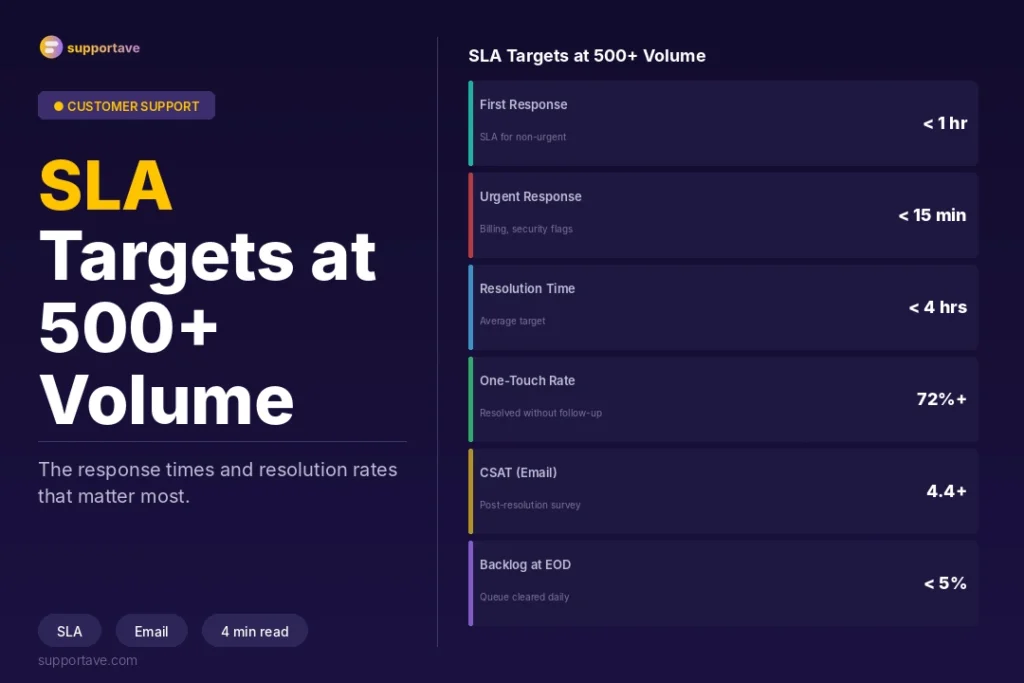
SLAs define what your team is accountable for. For email support at 500+ tickets per day, the minimum SLAs to set before launch:
- First response time: under 2 hours for standard tickets, under 30 minutes for tickets flagged as urgent by AI triage.
- Full resolution time: under 24 hours for routine tickets, under 4 hours for urgent. Measure this separately from first response time, because fast first responses followed by slow resolutions produce low CSAT scores.
- First contact resolution rate: target 75 to 85% for routine tickets. Below 70% suggests your macro library is missing key ticket types or your agents need product knowledge reinforcement.
- CSAT score: target 4.2 and above on a 5-point scale. Below 4.0 consistently indicates a systemic problem with response quality, not a volume problem.
- Queue backlog: the number of tickets older than your FRT SLA at any given moment. This is the most actionable leading indicator: a rising backlog predicts CSAT decline 48 to 72 hours before CSAT scores drop.
Quality Assurance at Volume
QA at 500+ tickets per day means sampling systematically, not reviewing everything. The standard approach:
- Review 3 to 5% of total daily volume, randomised across agents and ticket types.
- Score each reviewed ticket on: accuracy of information provided, brand voice adherence, resolution appropriateness, and handle time.
- Weekly calibration: your internal team and the outsourced QA lead review the same 10 tickets independently and compare scores. Gaps in scoring reveal interpretation differences that need to be resolved through updated training materials.
- Monthly macro review: which macros are generating follow-up tickets or CSAT below 4.0? Those are not resolving the issue, they are deferring it. Update them.
Frequently Asked Questions
How many agents do I need for 500 email tickets per day?
At a handle time of 5 to 8 minutes per ticket (realistic for a well-built macro library and AI-assisted drafting), one agent can handle 60 to 90 tickets per day at quality standards. For 500 tickets per day, that requires 6 to 8 agents with no AI assist, or 3 to 4 agents with proper AI triage and a strong macro library. The AI and macro investment typically pays for itself within the first month through reduced headcount requirement.
What is the difference between per-ticket and per-agent pricing for outsourced email support?
Per-agent pricing gives you a predictable monthly cost regardless of how many tickets that agent resolves. Per-ticket pricing scales directly with volume, which is advantageous for businesses with highly variable ticket volume (seasonal e-commerce, for example) but can become expensive when volume spikes unexpectedly. For businesses with relatively consistent daily volume, per-agent pricing is easier to budget and typically cheaper above 300 tickets per day.
How do I ensure quality when an outsourced team responds to my customers?
Quality at scale comes from systems, not from individuals. A well-built macro library, a searchable knowledge base, clear escalation criteria, AI-assisted drafting, and a structured weekly QA programme consistently produce quality above what an under-resourced in-house team achieves. The failure mode is treating handoff as complete when the team goes live: quality requires ongoing calibration sessions, macro updates based on customer feedback, and regular product knowledge refreshes as your offer evolves.
Can AI replace my email support team entirely?
For transactional, low-complexity ticket types, AI-only resolution is possible and already happening for some ticket categories. Order status, tracking updates, simple FAQ responses, and standard return policy queries can be resolved by a well-configured AI with high accuracy. Complex disputes, emotionally charged complaints, account-specific issues, and anything requiring judgment outside a documented policy still require human agents. The realistic current ceiling for AI-only email resolution is 40 to 55% of total ticket volume, with the remainder requiring human handling.
How quickly can an outsourced email support team be operational?
A basic dedicated team covering email can be operational within 3 to 4 weeks of signing, including brand training, tool integration, and initial QA calibration. Teams achieving consistent quality from day one have their macro library, knowledge base, and escalation criteria ready before agent onboarding begins. Teams that provide these materials partway through onboarding typically need an additional 2 to 3 weeks before quality reaches target levels.
Supportave’s email support outsourcing service provides dedicated agents trained in your brand voice, working directly in your helpdesk with AI-assisted triage and a structured QA programme. See our email support services or contact us to discuss your volume and requirements.