
Performance Max Campaigns in 2026: Complete Guide for Small Businesses
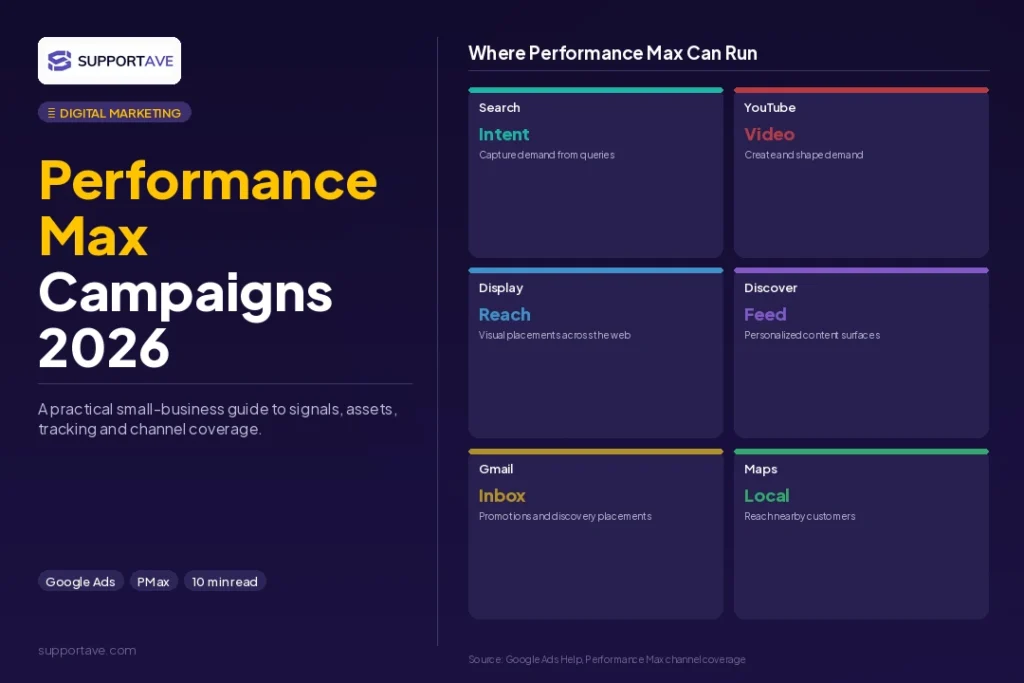
Performance Max has become the anchor campaign type for most serious Google Ads accounts in 2026. One campaign, one budget, and Google’s AI handles placement across Search, Shopping, Display, YouTube, Gmail, Discover, and Maps simultaneously. For small businesses, that reach is compelling. For those who set it up incorrectly, it is also one of the most efficient ways to waste budget without knowing why. This guide covers how PMax works, when to use it, how to set it up correctly, and how to optimise it once it is running. If you are also running Google Shopping alongside PMax, our Google Shopping Ads setup guide covers the feed and Merchant Center configuration that feeds into both campaign types.
Quick Answer: Performance Max (PMax) is a Google Ads campaign type that uses AI to serve ads across all Google channels from a single goal-based campaign. Set it up correctly by fixing conversion tracking first, providing full asset groups (not just a product feed), loading audience signals from your customer list and website visitors, starting with Maximise Conversion Value bidding, and waiting at least 4 to 6 weeks before making significant changes. The most common PMax mistake is launching with incomplete assets and then making changes before the learning phase is complete.
What Performance Max Actually Does
Traditional Google Ads required separate campaigns for Search, Display, Shopping, and YouTube. PMax replaces that fragmented structure with one campaign that serves across all of them. Google’s machine learning decides in real time which channel, which audience, and which creative combination is most likely to convert, then bids accordingly.
For small businesses, this removes significant management complexity. Instead of managing five campaign types with separate budgets and creatives, you manage one. The trade-off is control: you cannot choose specific keywords, you cannot set placement-level bids, and until recently you had limited visibility into which channels and queries were driving results.
In 2026, PMax is no longer the black box it was in 2022 and 2023. According to Surfside PPC’s 2026 PMax guide, the platform now includes campaign-level negative keywords, customer list exclusions, brand controls, full placement reporting, and asset experiments. The advertisers winning with PMax are those who provide high-quality inputs and steer the automation deliberately rather than letting it run unconstrained.
When Performance Max Makes Sense for Small Businesses
PMax is not the right starting point for every Google Ads account. Use this framework:
- Use PMax when: you have an e-commerce store with a product feed in Google Merchant Center. PMax is the default Shopping campaign type in 2026 and significantly outperforms Standard Shopping on total conversion volume for most advertisers with sufficient data.
- Use PMax when: you are generating 30 or more conversions per month and want to expand reach beyond Search. PMax needs at least 30 monthly conversions to stabilise. Below that, the algorithm is effectively guessing.
- Use PMax when: you have strong creative assets. PMax with only a product feed and two images runs at a fraction of its potential. Full asset groups with images, headlines, descriptions, logos, and video consistently outperform partial setups.
- Do not use PMax when: you are brand new to Google Ads with no conversion history. Start with a Search campaign, build conversion data, then add PMax. PMax launched without conversion history and without audience signals is Google’s algorithm spending your budget to learn what you could have taught it from a Search foundation.
- Do not use PMax when: brand keyword control is critical and you have not set up brand exclusions. PMax can cannibalise branded Search traffic, inflating reported conversions without generating incremental results.
Step-by-Step Performance Max Campaigns 2026 Setup
Step 1: Fix conversion tracking before anything else
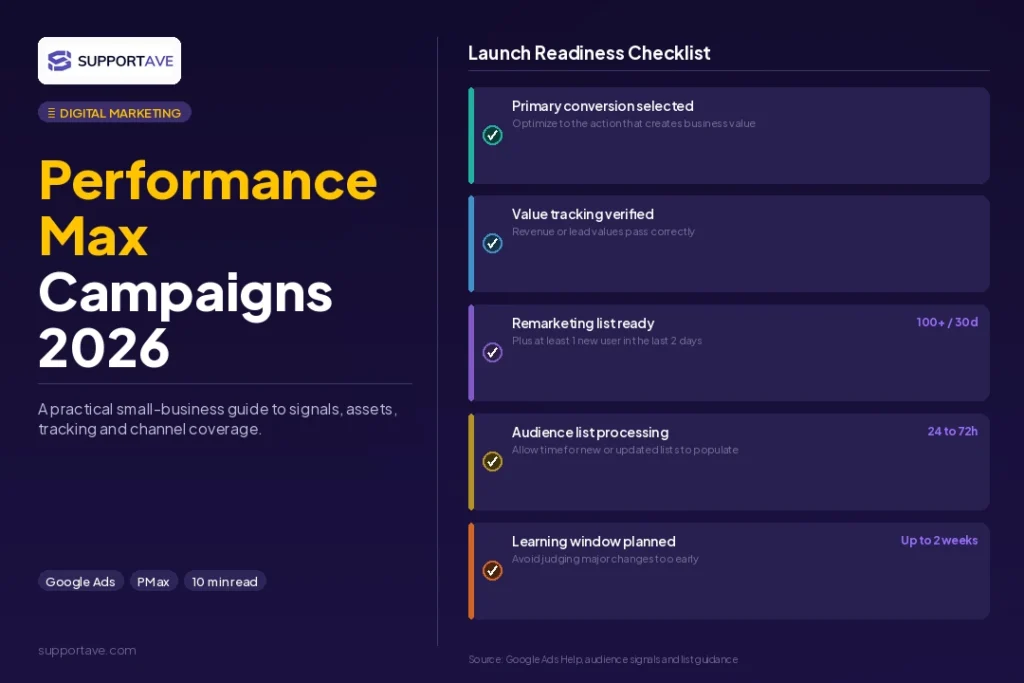
This is non-negotiable. PMax’s bidding AI optimises toward whatever conversion signal you give it. If your tracking is broken, incomplete, or measuring the wrong events (page views instead of form submissions), the AI will spend your budget generating events that do not reflect business outcomes. Our Google Ads conversion tracking setup guide walks through the exact GTM configuration to get this right. Enable Enhanced Conversions and ensure conversion values are being passed accurately.
Step 2: Create the campaign
- In Google Ads, click the blue plus button and select New Campaign.
- Choose your objective: Sales for e-commerce, Leads for service businesses, Local Store Visits for brick-and-mortar. Choose only one. Mixing objectives in a single campaign confuses the algorithm and produces compromised results for both goals.
- Select Performance Max as the campaign type.
- Connect your Merchant Center account if you have a product feed. For e-commerce, the product feed is the primary matching signal between your products and search queries.
- Name the campaign clearly: for example ‘PMax, UK, All Products, Q3 2026’. Campaign naming matters when you are running multiple campaigns and need to interpret reporting quickly.
Step 3: Set your budget and bidding strategy
PMax uses automated bidding only. The two options relevant to most small businesses:
- Maximise Conversion Value (no target): tell Google to spend your budget to generate the most total conversion value. Use this when starting out or when you have fewer than 30 to 50 conversions per month. The algorithm needs freedom to explore before you constrain it with a ROAS target.
- Target ROAS: tell Google to aim for a specific return on ad spend while maximising conversion value. Use this once you have at least 50 monthly conversions with stable value. Set your target no more than 20% above your recent actual ROAS to avoid restricting reach too aggressively.
Budget: start with enough to generate at least 3 to 5 conversions per day. At a 3% conversion rate and an average CPC of $3, getting 3 conversions per day requires roughly $30 per day in budget. Below this level, the algorithm accumulates data too slowly to optimise meaningfully.
Step 4: Build your asset group
The asset group is where your creative lives. Google assembles combinations from your assets to create ads across all channels. The minimum asset requirements and the recommended targets:
| Asset Type | Minimum Required | Recommended |
| Headlines | 3 | 10 to 15 (character limit: 30 each) |
| Descriptions | 2 | 4 to 5 (character limit: 90 each) |
| Long headlines | 1 | 5 (character limit: 90 each) |
| Images (landscape 1.91:1) | 1 | 3 to 5 high-quality images |
| Images (square 1:1) | 1 | 3 to 5 images |
| Logos | 1 | 1 to 2 |
| Videos | 0 (optional but critical) | 2 to 3 (15 to 30 seconds) |
| Business name | 1 | 1 (matches your brand name) |
Verdemedia’s guide on PMax for small businesses is clear: campaigns with 20 or more high-quality assets consistently outperform those with only the minimum. The key word is quality. Do not add assets to hit a number. Every headline should be compelling. Every image should be clean and high-resolution. Video assets unlock YouTube placements and dramatically expand reach, making them the highest-impact addition for campaigns currently running without video.
Asset groups should be organised by theme, not by format. Instead of separate asset groups for ‘images’ and ‘videos’, create asset groups around distinct product categories or audience segments: ‘Running Footwear’, ‘Business Casual’, ‘Clearance’. Google performs better when it can identify the relationship between your creative, your product, and the audience within each asset group.
Step 5: Load audience signals
Audience signals are not targeting restrictions. They are hints: you are telling Google where to start looking. The AI is not limited to these audiences but uses them to accelerate the learning phase.
- Customer lists: upload your existing customer email list as a customer match audience. This tells the algorithm what your typical converter looks like at a profile level.
- Website visitors: add a remarketing list of recent site visitors. Your highest-intent audience is people who have already visited your site.
- Custom segments: create a custom segment from search terms your customers use or from URLs of competitors’ and relevant industry websites. These intent-based signals help the algorithm identify in-market audiences.
- In-market and affinity: add Google’s in-market categories that match your product category as a supplementary signal.
The Learning Phase: What to Expect and What Not to Touch
When a PMax campaign launches, it enters a learning phase lasting approximately 4 to 6 weeks. During this period, the algorithm is testing placements, audiences, and creative combinations to identify what drives conversions. Performance is often unstable: some days will overperform, others will underperform.
The number one mistake during the learning phase: making frequent changes. According to Surfside PPC’s 2026 PMax guide, the most common structural mistake advertisers make is over-optimising during learning. Budget changes above 20%, bidding strategy switches, new asset groups, and campaign pausing all reset or extend the learning phase. The rule is simple: if you cannot give PMax 30 conversions and 4 to 6 weeks without touching it, you do not have sufficient budget to run it effectively at this stage.
Weekly Optimisation: What to Actually Monitor
Once the learning phase is complete, a weekly optimisation routine keeps PMax performing efficiently:
- Asset performance ratings: check which assets Google rates as ‘Low’, ‘Good’, or ‘Best’. Replace all Low-rated assets. Do not interpret Low ratings as feedback on messaging alone. A Low-rated image may simply not be rendering well in a specific placement format. Replace it and observe.
- Search themes and search term insights: PMax now provides search term data in the Insights tab. Review weekly to identify irrelevant queries and add negative keywords at the account level. Negative keywords in PMax are applied at the account level, not the campaign level.
- Audience insights: the Insights tab shows which audience segments are converting. Use this to inform which custom segments to add or remove from your audience signals.
- Placement exclusions: review the placement report monthly. Exclude placements that generate high spend with zero conversions, particularly in Display and YouTube where brand safety concerns may also apply.
- Budget and ROAS adjustments: increase budget by 10 to 20% increments every 5 to 7 days rather than large single jumps. Allow 7 to 14 days to stabilise after any significant change before evaluating performance.
Frequently Asked Questions
Should small businesses start with Performance Max or Standard Shopping?
For e-commerce businesses new to Google Ads: start with Standard Shopping for the first 30 to 60 days to build conversion history and learn which products perform. Store Growers’ 2026 PMax guide recommends this sequence because Standard Shopping gives you search term visibility and product-level bid control that teaches you what works before you hand the wheel to PMax automation. Once you have 30 or more monthly conversions from Standard Shopping, introduce PMax for the broader catalogue while keeping Standard Shopping for your hero SKUs.
Does Performance Max cannibalise my existing Search campaigns?
It can, and this is a legitimate concern. PMax can serve on branded search terms, effectively showing for queries your existing Search campaigns already cover and inflating your reported conversion count without driving incremental results. The solution: add your brand keywords as negative keywords to your PMax campaign at the account level, and ensure your branded Search campaign has higher priority for brand queries. Monitor your branded Search campaign’s impression share for signs of cannibalisation after PMax launches.
What is the minimum monthly budget for Performance Max?
Most PMax experts recommend a minimum of $1,500 to $3,000 per month for a small business to generate enough conversion data for meaningful optimisation. Below $1,500 per month, the algorithm lacks sufficient data to exit the learning phase and deliver stable performance. If your budget is below $1,000 per month, start with Standard Shopping or Search campaigns to prove ROI before adding PMax.
How do I know if my Performance Max campaign is working?
Track three metrics: ROAS against your break-even point (see our ROAS guide for the break-even calculation), conversion volume trend over the first 60 days (it should improve as the algorithm learns), and new customer acquisition rate if you have new customer value goals set. Do not evaluate performance in the first 2 weeks. Do not make bidding changes without checking if the campaign has exited the learning phase first.
What happens if my PMax campaign shows zero conversions after two weeks?
Two weeks without conversions almost always points to a conversion tracking problem rather than a campaign performance problem. Verify in Google Ads under Goals then Conversions that your conversion action is active and recording. If tracking is confirmed working, check that your budget is sufficient to generate enough traffic (at your site’s conversion rate) for conversions to register statistically. Finally, check that your asset group has enough assets for Google to serve ads across multiple placements.
Supportave manages Google Ads campaigns including Performance Max setup, feed optimisation, and ongoing optimisation for e-commerce and service businesses. See our digital marketing services or contact us to discuss your Google Ads strategy.