
Web App vs Website: What’s the Difference and Which One Do You Need?
Most people use the terms interchangeably, and most agencies let them. But choosing the wrong one, starting with a website when you need a web app, or over-engineering an app when a simpler site would serve, is one of the most expensive early decisions a business can make. This guide explains the actual difference in plain language, gives you real examples of each, and provides a clear decision framework so you build the right thing first time. If you are also weighing which technology platform to build on once you know what you need, our React vs Next.js vs WordPress comparison covers the technical platform decision that follows.
Quick Answer: A website presents information for visitors to read and browse. It is a one-way channel. A web app lets users take actions, create accounts, manipulate data, and receive personalised responses. It is a two-way system. The simplest test: does your product require a database and user authentication? If yes, it is a web app. If no, it is likely a website. Many modern digital products are hybrids of both, starting as a website and adding app functionality over time.
The Core Difference in Plain Language
A website is a collection of pages that deliver content to visitors: text, images, video, downloadable resources. The visitor receives and the website broadcasts. A restaurant’s online menu, a law firm’s service pages, a portfolio, a blog, are all websites.
A web app is interactive software that runs in a browser. The visitor participates. They log in, create a profile, submit data, process a payment, manage their orders, collaborate with others, or receive personalised content based on who they are. Gmail, Trello, Canva, and any SaaS platform are web apps.
As Bubble described it in their 2026 web app guide: a website informs and a web app interacts. A website is a digital brochure. A web app is a digital tool.
The critical implication: websites and web apps require meaningfully different architecture, development timelines, budgets, and ongoing maintenance. Misidentifying one as the other at the start of a project is where expensive rebuilds originate.
Real Examples of Each
| Type | Examples | What users do |
| Website | Corporate site, portfolio, blog, restaurant menu | Read, browse, fill a contact form |
| Dynamic website | News site, e-commerce catalogue, marketing site | Browse, search, filter, no login or saved data |
| Web app | Gmail, Trello, Canva, Shopify admin panel | Log in, create, save, manage, collaborate |
| SaaS web app | Salesforce, Notion, Figma, HubSpot | Multi-user accounts, persistent data, complex workflows |
| Hybrid | Amazon, HubSpot public site plus app layer | Public info pages alongside a logged-in functional layer |
The Five Technical Differences That Actually Matter
1. Authentication
Websites are typically public. Anyone can access content without logging in. Web apps almost always require user authentication. Users create accounts, log in, and receive a personalised experience based on their identity and history. If your product needs a login screen, it is a web app.
2. Database and Data Persistence
Websites present fixed or editorially managed content. Web apps store and retrieve user-specific data in real time. When a user saves a document in Notion, books a table in a restaurant app, or updates their CRM records, the web app is reading from and writing to a database on their behalf. This data layer is the engineering backbone of every web app.
3. Server-Side Business Logic
Web apps process inputs. They do not just display content. Payment processing, fraud checking, inventory management, recommendation engines, permission hierarchies, and notification triggers are all server-side business logic that a website has no need for and a web app cannot function without.
4. State Management
Web apps need to track state: what the user has done, what they are doing, and what they are allowed to do next. A shopping cart that persists across pages, a multi-step onboarding flow that remembers completed steps, and a dashboard that reflects live data all require state management. Static and dynamic websites have minimal state requirements by comparison.
5. SEO Profile
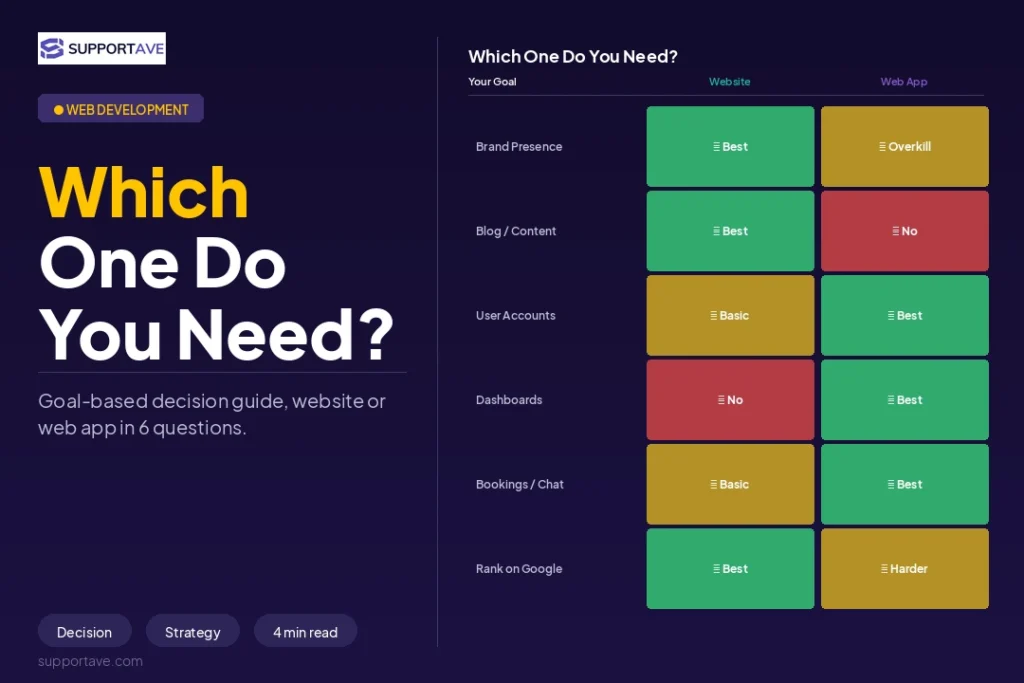
Websites are generally more SEO-friendly by default. Static or editorially managed content is easily crawled and indexed. Web apps, particularly those that render content client-side after authentication, have a more complex SEO relationship because much of their content is behind a login and therefore not indexable. As we covered in our Next.js vs WordPress comparison, server-side rendering allows web apps to deliver SEO-visible public content while still maintaining app-like interactivity behind authentication.
Cost and Timeline Comparison
| Factor | Website | Web App |
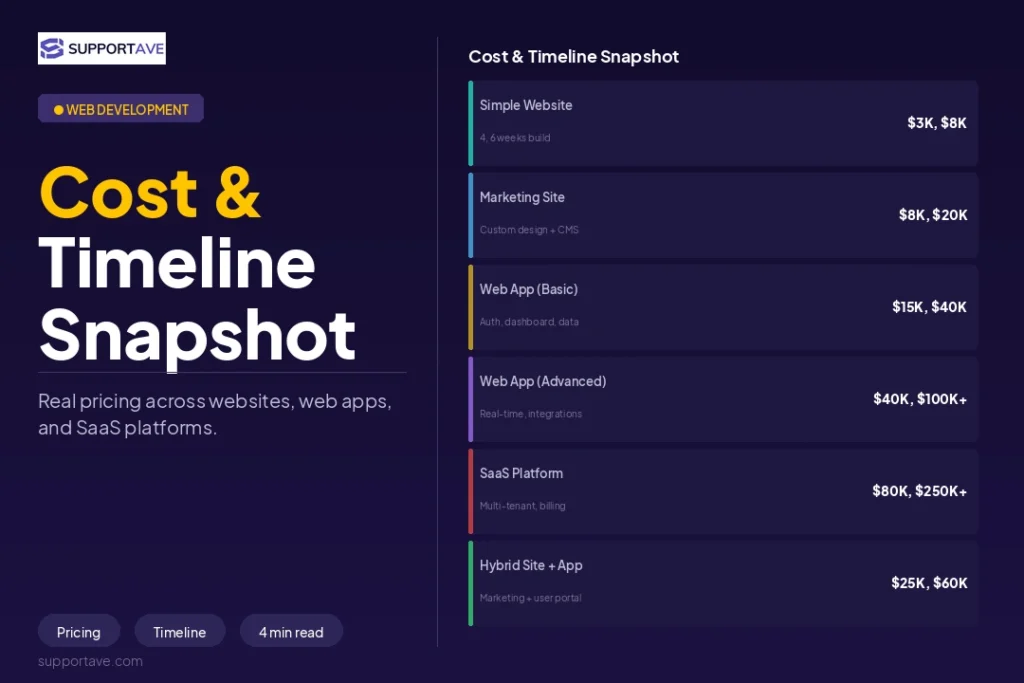
| Typical cost range | $3,000 to $20,000 | $20,000 to $200,000 and above |
| Typical timeline | 4 to 10 weeks | 3 to 12 months or more |
| Backend complexity | Minimal or none | Core requirement |
| Database requirement | Optional (headless CMS only) | Required |
| Ongoing maintenance | Low to moderate | Moderate to high |
| Security requirements | Standard (SSL, basic) | Significant (auth, data encryption, compliance) |
For detailed pricing at each budget level, our website cost guide for 2026 covers what you get at each investment tier. For a build that bridges website and web app, our guide on full-stack web development agencies explains how that kind of engagement is structured and priced.
Decision Framework: Which One Do You Actually Need?
Answer these questions in order. The first yes tells you what you are building.
- Do users need to create accounts and log in? Web app.
- Do users need to save, edit, or retrieve their own data between sessions? Web app.
- Does your product process payments or financial transactions? Web app, or a website with a third-party payment API.
- Do you need real-time features: live updates, chat, or collaborative editing? Web app.
- Do you need to serve different content to different users based on who they are? Web app.
- If you answered no to all of the above, and your goal is to present information about your business and generate enquiries: Website.
Hybrid reality: Many businesses need both simultaneously. HubSpot has a public marketing website with blog posts, pricing pages, and case studies, all fully SEO-optimised and publicly accessible. Behind the login is a completely separate web application: the CRM, the CMS, the email platform, all with their own data architecture and UI. Starting with the public content layer and adding the authenticated app layer later is a valid architecture, provided the original build accounts for future expansion.
When a Website Can Become a Web App Later
Sometimes, but rarely cleanly. Website architecture is typically not designed to support user authentication, databases, or server-side business logic. Adding these features later usually means significant structural rework rather than straightforward extension. If you know you will need web app functionality within 12 to 18 months, discuss with your agency whether to build on a foundation that can extend. Our checklist for hiring a web development agency includes specific questions to ask about scalability and future-proofing before signing any contract.
For cross-platform mobile functionality that complements a web app, our guide on React Native mobile app development covers how a single codebase can deliver both iOS and Android experiences alongside a web app.
Frequently Asked Questions
Is an e-commerce store a website or a web app?
It depends on complexity. A simple Shopify store using standard themes, with product pages, a cart, and a checkout, is closer to a dynamic website. The core functionality is provided by Shopify’s own application layer. A custom e-commerce platform with user accounts, saved wishlists, personalised recommendations, inventory management, and order tracking is a genuine web app and should be scoped and budgeted accordingly.
Does a contact form make my website a web app?
No. A contact form submits data to an email address or CRM but does not create a persistent user session or store user-specific data. Adding a form to a website does not cross the architecture boundary into web app territory. The boundary is crossed when your product needs to maintain user identity and data across multiple sessions.
What does a web app cost compared to a website?
A professional website for a small to mid-size business typically costs $3,000 to $20,000. A web app in the MVP to medium-complexity range typically costs $20,000 to $80,000. Complex web apps with real-time features, multiple integrations, and enterprise-level security run $100,000 and above. The wide range reflects genuine variation in scope, not arbitrary agency pricing.
Can I use WordPress to build a web app?
WordPress is primarily a content management system optimised for websites and content publishing. It can be extended with plugins and custom development to handle some app-like functionality, such as user registration, simple membership areas, and WooCommerce for e-commerce. For genuine web apps with complex business logic, real-time features, or custom data architecture, React, Next.js, or a purpose-built backend framework will produce a more reliable and scalable result than WordPress extended beyond its natural use case.
What is a Progressive Web App and is it different from a web app?
A Progressive Web App (PWA) is a web app built with specific browser APIs that allow it to be installed on a device like a native app, work partially offline, and receive push notifications. It is a subset of web apps, not a separate category. PWAs bridge some of the gap between web apps and native mobile apps without requiring App Store distribution. They are worth considering when you want app-like behaviour without the cost and complexity of building a separate native mobile application.
Supportave builds both websites and web applications, and our discovery process identifies which one your product requires before any development begins. See our web development services or contact us to discuss your project.